
Build a character sheetof yourself
You already own the expensive part. Hours of footage of your own face, shot in your real light, in your real clothes. This turns that footage into an asset that keeps you looking like you in every image and video you generate after it.
A character sheet is two things,
not one picture.
A text spec
Your face, hair, build and wardrobe written down precisely enough that it renders the same twice. This gets pasted into every prompt you ever write.
An image anchor
A flat, evenly lit reference plate of you, attached to every generation.
Text alone drifts. An image alone cannot be edited. Together they hold. That pairing is the mechanic every serious AI production runs on, and it is the only part of this that cannot be skipped.
What one actually looks like.
This is Andrew's character, built with the exact method below. Left to right is the order you build in.

Pulled from footage. Front facing, even light.
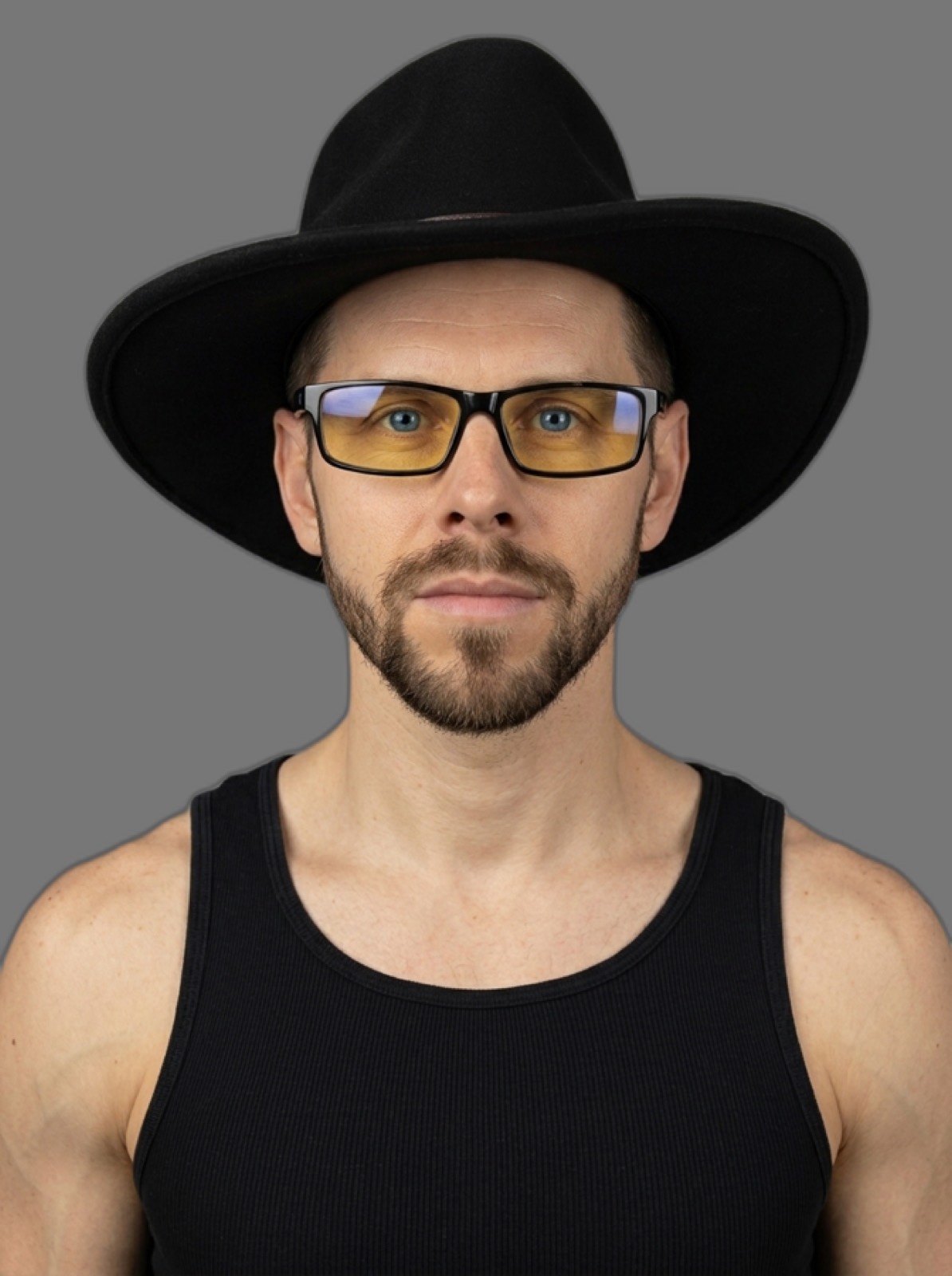
Flat 18% grey. Zero shadow anywhere.
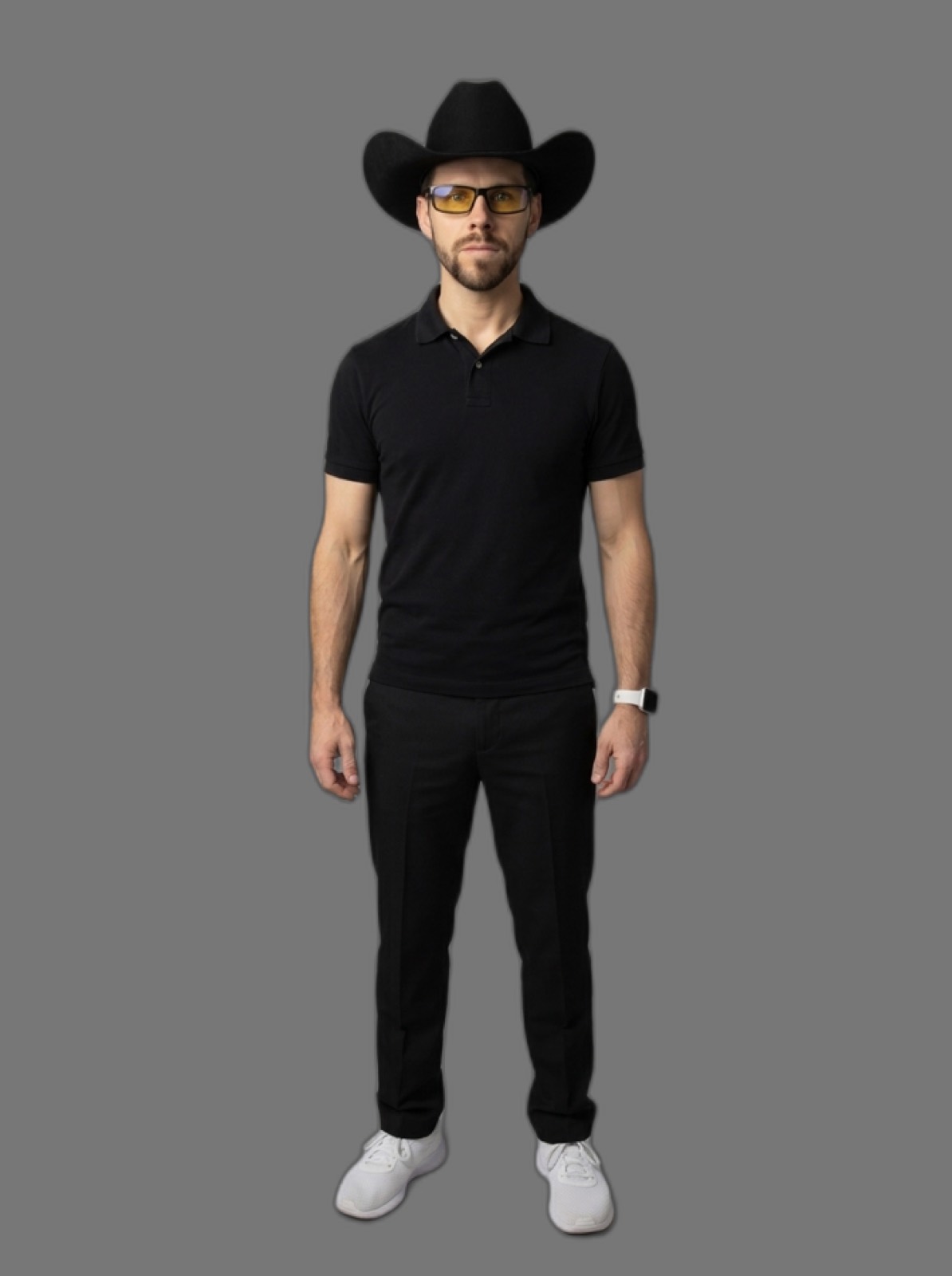
Signature wardrobe, identical field.
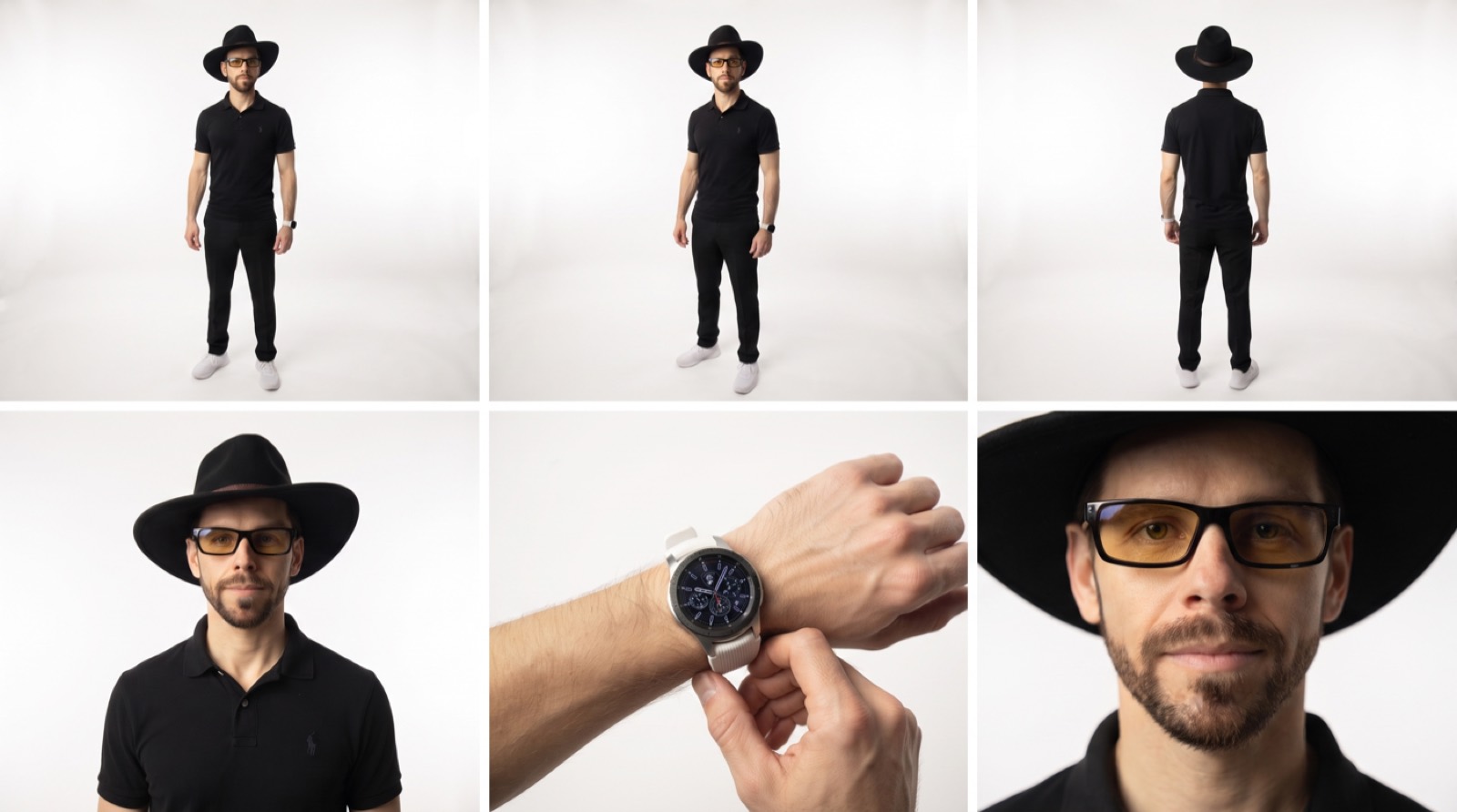
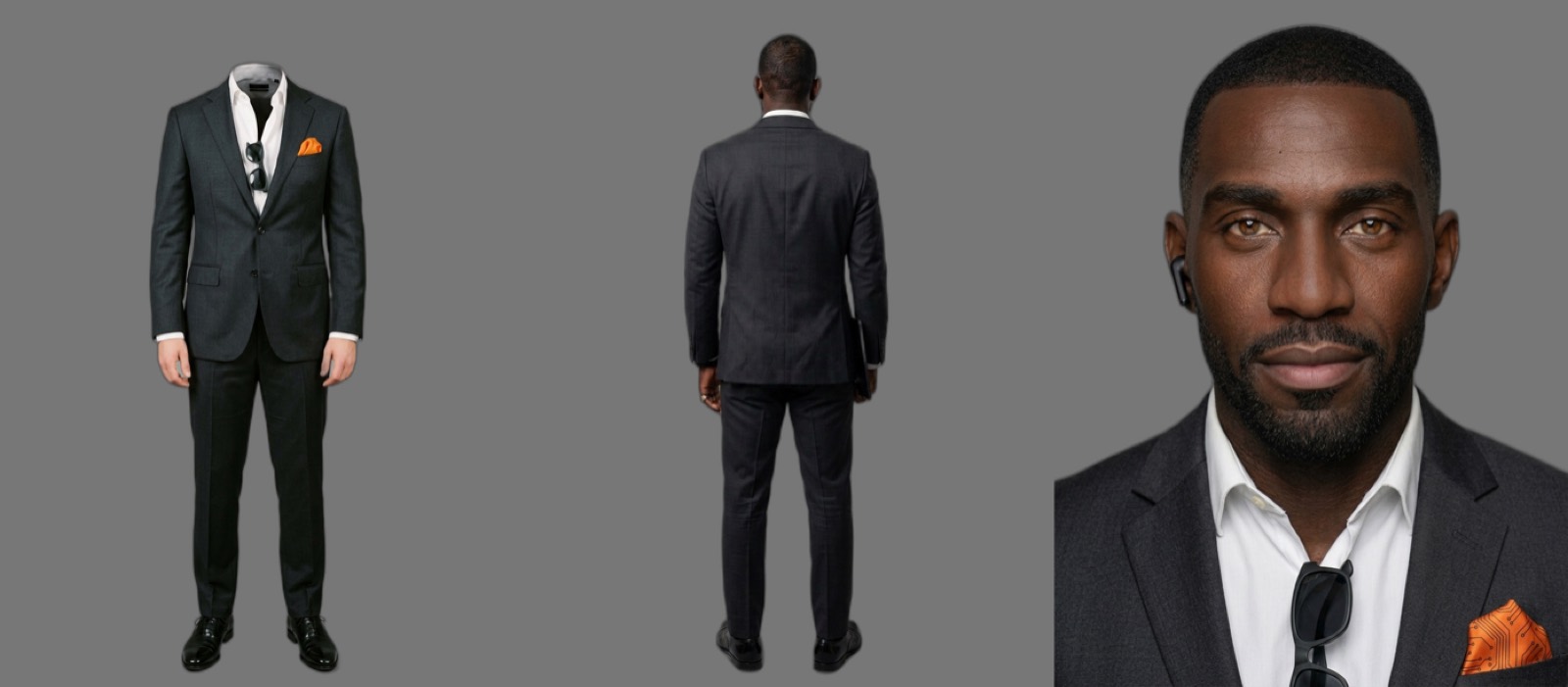
Look at what every plate shares. Dead flat grey. No shadow pooling under the feet, no light falling off behind the shoulder, no background blur. That is deliberate, and it is most of the trick. A plate is a reference, not a photograph. Any lighting baked into it gets inherited and amplified by everything you generate from it later, and it will fight whatever the actual scene wanted.
Build in this order.
Every step earns its place by what it prevents. A sheet built before an approved outfit invents a look, and the invention quietly becomes canon. An outfit built on an unlocked face drifts the face. Skipping costs more than doing.
Set up once.
A Claude Project
Make a new Project, then upload the three skill files from the zip on this page. Drop your reference stills into Project Knowledge. Every chat inside that Project then already knows the method and already knows your face. No re-pasting, no drift between sessions.
A kie.ai account
One account, one balance, and nearly every image and video model worth using sits behind a single API. Credits run about half a cent each, so a character plate costs roughly nine cents.
Two separate chats, permanently
Keep image prompting and video prompting in different conversations. The rules of one job poison the other. Image work wants flat light and anti-CG wording; video work wants field of view in degrees and motivated light. The team behind a 137 scene AI feature named this as their own hard rule.
Do it.
- 1
Pull 8 to 12 stills from your own videos
Screenshot straight from your uploads. What you want:
- Mostly front facing, neutral expression, mouth closed. That is what a face lock is built from.
- Two or three profile or three quarter angles, for bone structure.
- Clean, even light. Skip heavily graded, backlit and moody-key frames.
- Skip sunglasses, hats and headphones unless they genuinely belong to the character.
- One or two waist-up or full body frames, for build and proportion.
Your single most valuable frame is a well lit, front facing, resting face. If one exists in your footage, it outranks ten mediocre ones.
- 2
Have Claude write the spec from the pictures
This is the step people skip and the one that decides everything. Do not describe yourself from memory. Nobody can, and a wrong detail hardens into canon. Upload the stills, paste this:
Prompt 1. Forensic extractionI'm building a character sheet of myself so I can generate consistent AI images and video of me. The attached images are real screenshots of me from my own videos. Build a written character spec by looking ONLY at these images. Rules: - Describe what is visibly there. Never invent, never fill a gap with a plausible guess. If something is needed but not visible in any image, ASK me instead of guessing. - Never use my name and never use an age word or number. Describe apparent register by build and bearing instead. - Describe by visual fact, not vibe. "Jaw squares off below the ear with a defined gonial angle" renders. "Strong jaw" does not. - Where two images disagree, say so and ask which is current. Cover, in this order: 1. Build, bearing, proportions, posture 2. Skin: tone, undertone, finish 3. Head and face structure: head shape, forehead, temples, cheekbone height and projection, cheek hollow, jaw angle, chin shape and projection, the line from ear to chin 4. Eyes: shape, set, spacing, outer-corner tilt, lid crease, iris colour and its variation, limbal ring, under-eye structure 5. Brows: shape, arch position, thickness, density, hair direction, colour relative to hair 6. Nose: bridge width and straightness, tip shape and projection, nostril shape 7. Lips: upper vs lower fullness, cupid's bow, philtrum, mouth width, corner shape 8. Facial hair: exact length in millimetres, coverage map, edge lines, colour including any salt-and-pepper 9. Hair: colour with every nuance root to tip, length, texture, part, how it falls, hairline shape, recession if visible 10. Ears: shape, set, visibility under the hair 11. Identity markers: glasses, piercings, moles, scars, visible tattoos, each with exact placement relative to a fixed anatomical landmark 12. Default expression and energy at rest 13. Signature wardrobe, if the images show a consistent one. One clause per garment: fabric, colour, fit, neckline, sleeve, hem Output as a markdown doc I can save. Then list every detail you could NOT resolve from the images, as questions for me.
Then correct it. Claude will get a few things wrong, and it is always the same few: beard length, hairline, apparent age. Fix them, have it reissue the doc. This locked text is the sheet. Everything downstream is built from it.
- 3
Generate the face lock plate
Claude writes the prompt; it does not make the image. Take this to Nano Banana Pro on kie.ai, attach your best one or two reference stills, and run it.
Prompt 2. Face lockA clean cinema-character-reference 3:4 headshot of the same man as the attached reference photograph, framed from the forehead down to the upper chest with the face filling most of the frame, a true close-up, not a portrait with space around it. [PASTE YOUR LOCKED SPEC HERE. Sections 1 through 11, written as flowing prose, every detail in exactly one place, no repeats.] He wears a plain black ribbed tank, no jewellery, no logos, no graphics. Body squared to camera, head level, neutral relaxed expression, eyes directly to camera, lips closed and relaxed. The background is a single flat 18% neutral gray field, one uniform value at every pixel corner to corner, identical directly beside the subject and in the far corners, with no seam line, no gradient, no hotspot, no vignette, and no falloff to lighter or darker anywhere in the frame. It is a flat colour field, not a photographed backdrop. No surface, no floor, no wall, no corner, no horizon, and no plane the figure stands on or in front of. Relight from scratch overriding any reference lighting: completely flat shadowless illumination, one enormous soft frontal source at camera position wrapping the subject evenly, matched equal fill from camera-left and camera-right at identical intensity, matched fill from above and below, so both sides of the face read at exactly the same brightness. No key-and-fill ratio, no modelling, no shadow side, no cheek triangle, no nose shadow, no under-chin shadow, no rim light, no hair light, no kicker, no specular hotspot. Extremely low contrast, even, milky, catalogue-flat. Form is described by bone structure, hair strands and fabric folds alone, not by light and shadow. Absolutely zero shadow anywhere outside the subject. No cast shadow, no contact shadow, no floor shadow, no drop shadow, no ambient occlusion where the body meets the background, no soft darkening behind the shoulders, no halo, no edge darkening, no rim separating the figure from the field. Shading exists only on the subject and stops cleanly at the silhouette. Absolutely zero light bleed outside the subject. No spill, no glow, no bounce, no reflected colour cast thrown onto the background. Skin reads matte and velvety, zero shine on forehead, nose bridge, cheekbones, temples and chin, no oily T-zone. Skin renders at its true natural tone, warmth preserved and natural against the neutral gray, never pale or washed-out or cool-shifted by the background. Real peach fuzz at the jaw and hairline, real soft fine even pore texture, subsurface scattering reading as semi-translucent biology, real hair rendered strand by strand with fine flyaways at the hairline, real fabric weave and drape. Never plastic, never waxy, never glass-skin. Fine flattering texture that keeps the face looking good, no acne, no blemishes, no rough pores. Even sharpness edge to edge across the entire frame. No depth-of-field falloff, no bokeh, no background blur, no lens vignette, no lens distortion, no flare, no bloom, no chromatic aberration, no atmospheric haze. Photographed on a 50mm prime, soft natural film grain. Photographed not generated.
That long closing block is not padding. It is the text that decides whether the plate is usable, and it goes on every plate, in full. Drop one clause and the plate comes back carrying lighting, which then infects everything you generate from it.
- 4
Judge it on two axes, never one
Show the new plate to Claude alongside your original stills and ask both questions separately:
- Does it match the spec? Every written detail present and correct.
- Is it the same person? The same man as the reference photos, or a stranger with his haircut.
Ask for concrete physical deltas. Beard length in millimetres, face width, apparent age read in years. Never a vibe judgment. A spec check on its own cannot catch a spec that drifted from reality, because the image passes perfectly while looking like somebody else.
When the written spec and the photos disagree, the photos win. Rewrite the spec from the images, then record in the doc that it was built forensically from photographs. Otherwise a later session will helpfully correct it back to the wrong version.
- 5
Outfit base, then the sheet
With the face locked, generate a full body plate in your signature outfit. Same flat grey field, same closing block, one clause per garment. Once that is approved, render the three sheet panels as three separate images and paste them side by side in any editor:
- Left. Full body, front, head removed rather than cropped, full headroom preserved.
- Centre. Full body, rear, head attached.
- Right. Tight chest-up face lock, crown to collarbones, face filling the panel.
Never ask a model for a 3 panel layout with a reference attached. It discards the layout instruction and hands back a single figure in a scene. Compositing by hand also gives each panel the full pixel budget, which is the real reason three panels beat six.
Which model on kie.ai.
One account covers nearly everything. Credits run about half a cent each.
| Job | Model | Credits |
|---|---|---|
| Face lock, outfit base, sheet panels | Nano Banana Pro nano-banana-pro | 18 |
| Everyday plates, cheap iteration | Nano Banana 2 nano-banana-2 | 8 |
| Throwaway look-see pass | Nano Banana 2 Lite | 4 |
| Prompt adherence alternative | GPT Image 2 gpt-image-2-text-to-image | 6 |
| Edits, reverse angles, texture passes | Seedream 5 Pro Edit | 7 |
| Multilingual or alternate aesthetic | Qwen 2 (confirm the live tier) | ? |
| Anything that must contain real lettering | Ideogram v3 | 3.5 |
| Upscale the final locked image only | Topaz Image Upscale | ? |
Nano Banana Pro is the default for character work. It is the tier this flat plate method was written against, and the only one that reliably produces a genuinely flat shadowless plate from prompt alone.
Nano Banana 2 cannot do it.Tested four ways: with a reference, without one, and with the flat directives moved to the front. It inherits the reference's lighting and "relight from scratch" does not override it. If cost pushes you to NB2, generate normally, then cut yourself out and paste onto flat grey (119,119,119) in an editor. Anything a deterministic image operation can guarantee should never be asked of a model.
| Job | Model | Cost |
|---|---|---|
| You, speaking on camera | Gemini Omni Video gemini-omni-video | 21 + 10.5/s |
| Cinematic motion, no dialogue | Kling 3.0 Turbo | 18/s |
| Cheap fixed length clip | Kling 2.5 Turbo | 42 / 5s |
| Premium look, silent | Seedance 2.5 | 63/s |
| Short premium text to video | Sora 2 | 30 / 10s |
| Upscale the locked cut, once | Topaz Video Upscale | 40 / 5s |
Gemini Omni Video is the one for talking clips. It is the only option that does image to video and native spoken dialogue in one pass, which is what lets it anchor to your character plate. Durations available are 4, 6, 8 or 10 seconds. Veo 3 as wired is text to video only, so despite the name it cannot anchor to a plate at all.
Budget 2.2 to 2.7 words per second of speech and size the clip to fit. Overshoot and the line truncates: 16 words in 6 seconds dropped a whole sentence. Undershoot and the model fills dead air by repeating itself: 4 words in 8 seconds said the line twice. An explicit "say it once, never repeat" clause does not save you. It failed twice. Render at 720p, iterate at 720p, upscale the locked cut once.
Rules that save re-rolls.
Each of these was paid for in wasted generations by somebody else.
Never
Write the words sign, label, logo or text
The noun makes the model draw letterforms no matter how absolutely you negate it. It produced "TECH", "INDUSTRIAL" and cursive script across three plates that all explicitly banned text. Describe a glow, not a source. Real wordmarks get composited in afterwards, never drawn.
Never
Carve out an exception inside a no-text block
No "other than", no "except for". The exception reopens the door and captions appear.
Never
Write "photographed on a real set"
It sounds like realism. It switches on the lighting behaviour that ruins a reference plate.
Always
Biology on, camera off
Pores, peach fuzz, strand by strand hair, fabric weave: on, every time. Key light, shadow, bokeh, vignette, flare: off on every plate. The scene adds lighting later.
Always
Keep prompts lean once a reference is attached
Counter-intuitive and true. With a strong reference attached, the reference carries the identity, and the prompt's job is to say what to do with it. Spend the words on pose, hands and composition instead of re-describing a face already visible in the image. The face lock is the one exception. It has nothing to lean on.
Always
Say what each reference carries
When you attach more than one: "face and skin tone from the first, wardrobe from the second." Without that line the model averages them.
Watch
One plate serves a whole block of shots
A separate plate per framing drifts the face. Two plates in a lineage read as two different men. Render one, then crop tighter. Never upscale a crop; resampling sharpens features into something likeness filters flag and block.
Watch
Micro-details do not survive full body framing
An earring or a ring engraving is about ten pixels head to toe. Put them on the tight chest-up panel and stop re-rolling for them.
Watch
One asset per state
Bearded and clean shaven are two specs, not one spec with a note attached. Version them, v1 and v2-clean-shaven, and never overwrite. State drift kills more continuity than anything else on this page.
Watch
Measure before regenerating upstream
A fault assumed to be a bad plate cost two plate regenerations, both wasted. Measuring the frames proved the plate had been correct the whole time and the problem sat downstream.
What a feature scale production actually ran.
From the published methodology behind a 1h54m AI feature. 137 scenes, 473,204 generations, every prompt made public.
"The entire film was generated in Seedance, every shot, all video and speech. Faces and character sheets: Soul Cinema. Edits, reverse angles and point changes: Seedream and Nano Banana. Prompts: Claude, in two chats, one for image prompts, one for video prompts."
Cully Hill Boys production brief
Measured across 108,684 of their long-form prompts, the block that mattered most was naming your locked assets, at 74% usage. Negation showed up in only 29%. Stating what must be true beat listing what must not.
Their face tool, Soul Cinema, is proprietary to one vendor's interface and is not on kie.ai. Nano Banana Pro is the substitute. Their video tool renders silent as wired on kie.ai, so Gemini Omni Video takes anything with dialogue. Everything else ports across intact, including keeping image and video prompting in two separate chats.
Now go pull your stills.
Three skill files, a Claude Project, and a folder of screenshots you already have. The example plates on this page are Andrew Webber's character, built with this exact method.